FAQ
User FAQs
Answers about simultaneous users, access permissions, deactivating users, and creating user accounts.
Leer en español →Notice: This article describes features included in the Cosecha plan. Some features may not be available to users on the Semilla or Cultivo plans. Compare plans.
Can more than one user be logged into Aragro at the same time?
Yes. Aragro is a multi-user system.
Can I restrict users’ access to certain information?
Yes. You can assign specific permissions based on the function a user performs at your farm or company by assigning the corresponding Job position. This limits their access to the necessary sections within Aragro, as you determine.
If a colleague no longer works for my company and had access to Aragro, can I remove their access?
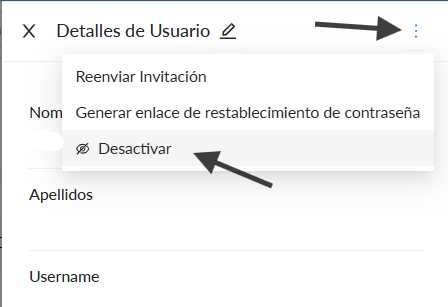
Yes. You can deactivate their access from the nine-dot menu in the upper-right corner, next to your username. Select Users, then the user you want to deactivate. A User details panel will open on the right side of the screen. Click the three-dot button in its upper-right corner and select Deactivate. Confirm the action in the message that appears. This revokes that user’s access to all of Aragro.
How do I create a user?
From the nine-dot menu in the upper-right corner, next to your username, select Users. Click + Create new and fill in the requested fields to create the user. The new user will receive an email to create a password.
Note: Fields marked with an asterisk (*) contain required information and must be completed to finish this step.