Guide
Recipes
Create and manage recipes for mixtures of inputs used in your agricultural activities.
Leer en español →Notice: This article describes features included in the Semilla plan.
The Recipes module in Aragro is designed to make it easier to manage and apply specific mixtures of inputs in your agricultural activities. This guide explains how to use the module.
Open the Recipes module
Section titled “Open the Recipes module”- In the left sidebar, select Inventory.
- In the Inventory menu, click Recipes to open the module.
Create a recipe
Section titled “Create a recipe”- In the Recipes module, click “+ Create new” to add a new mixture of inputs.
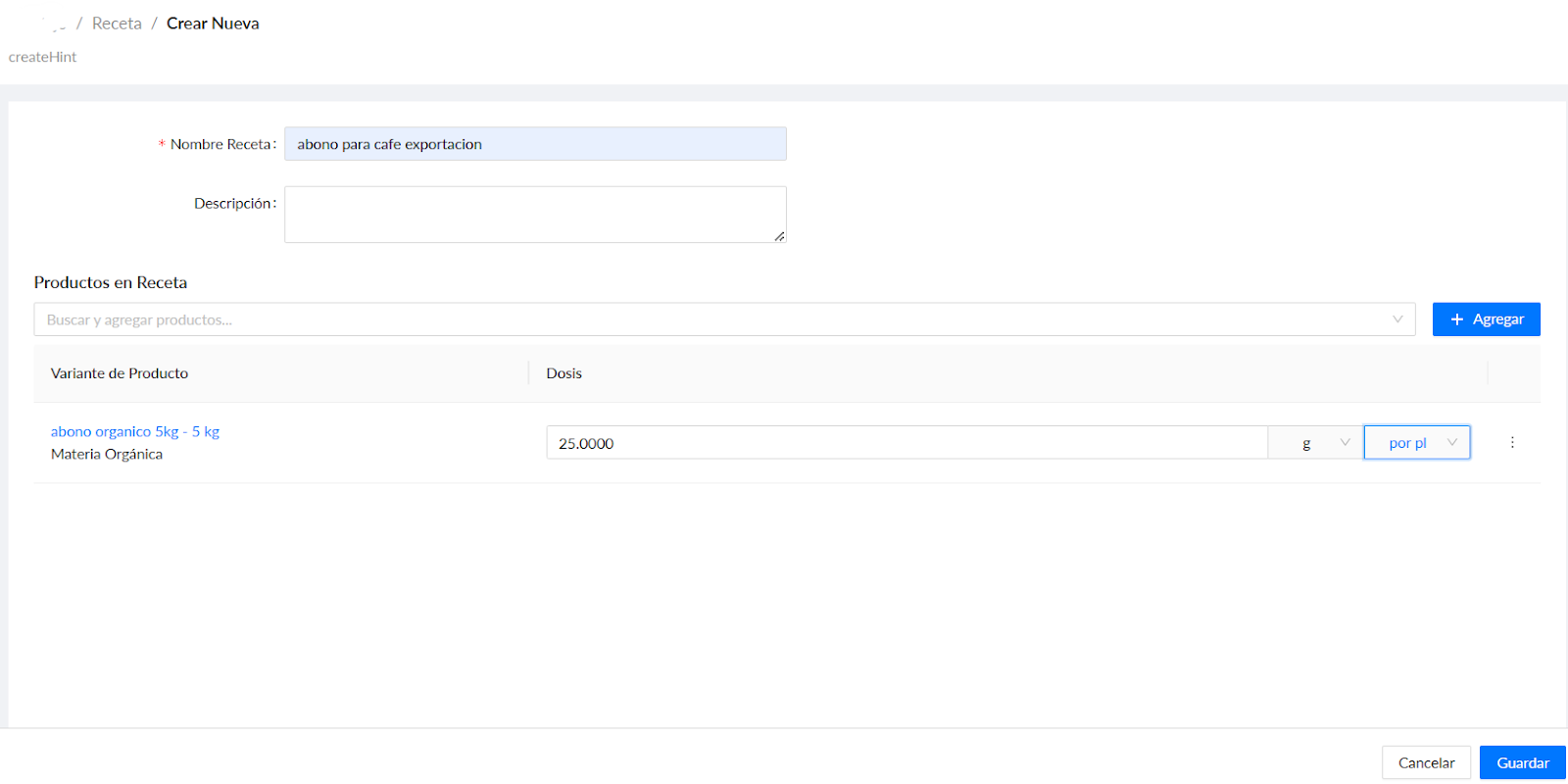
- Enter the recipe details:
- Recipe name: Give the mixture a descriptive name so it is easy to identify.
- Description: Add details about the recipe’s purpose and use.
- Products in recipe: Add the products in the mixture and specify the exact quantity of each.
- Unit of measure: Set the unit or dose for each input (kilograms, liters, and so on).
- Save the recipe: After completing all required fields, click Save to add the recipe to the system.
Using the Recipes module appropriately helps you standardize and optimize how input mixtures are applied, making your agricultural practices more consistent and helping you manage resources.